Referral programme
Invite friends to Blomo, get 10 USDT for each
Every Blomo account has its own invite link. When someone signs up with it and orders a card, Blomo credits 10 USDT to your referral balance. There is no limit on how many friends you invite. A friend brings one bonus at a time, and it is taken back if their card order is declined or cancelled.
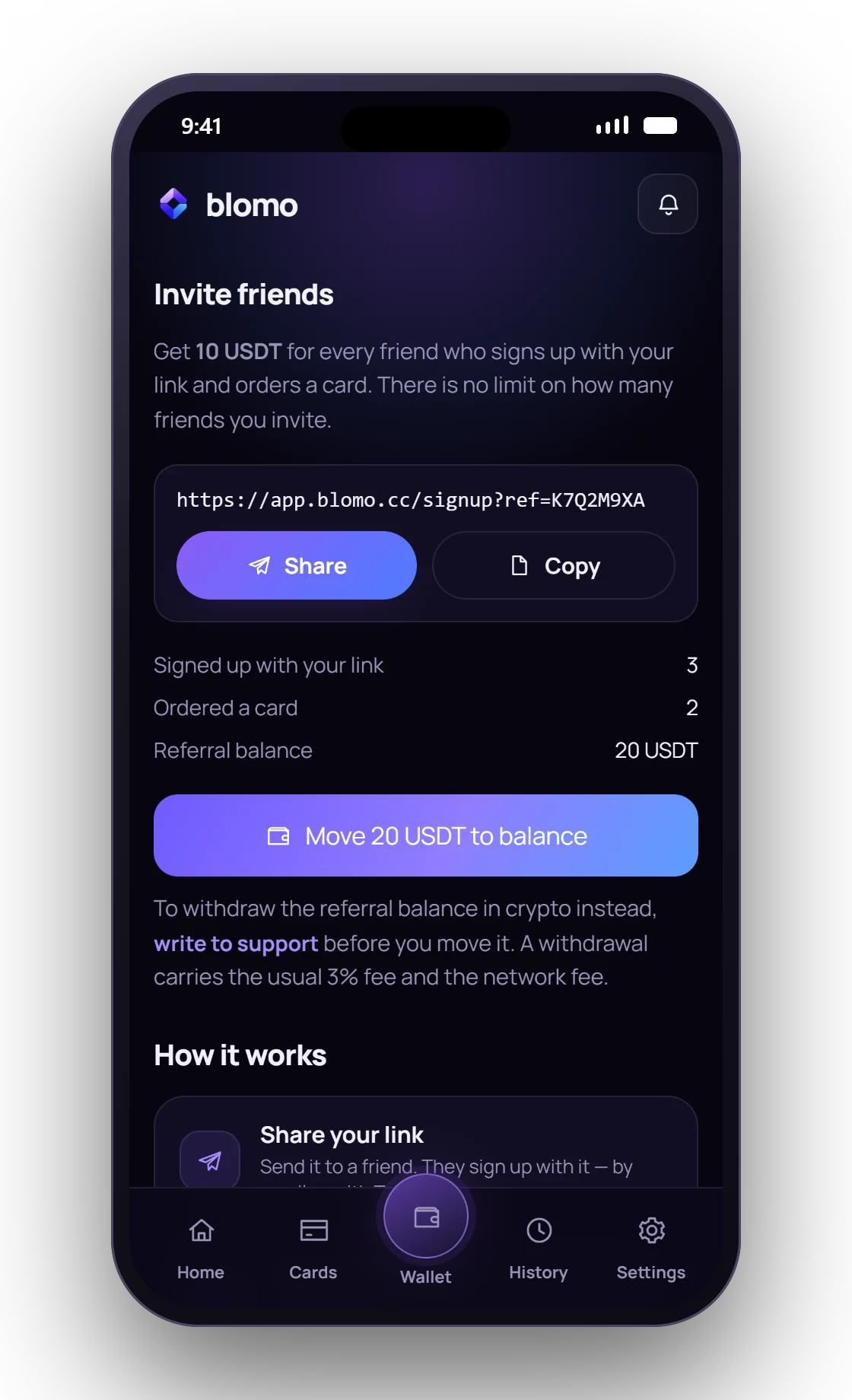
Open an accountEverything on one screen
- Your linkShare it or copy it in one tap; it does not expire.
- Who joinedHow many people signed up with your link, and how many ordered a card.
- Referral balanceBonuses collected and not yet moved.
- Move to balanceOne button sends the whole referral balance to your main balance.
Four steps from link to bonus
- Copy your link Open Settings, then Rewards, then Invite friends in the Blomo app. Share the link or copy it.
- Your friend signs up They create a Blomo account with your link, by email or with Telegram. An account that already exists cannot be attached later.
- They order a card The moment they place a card order, 10 USDT lands on your referral balance.
- You use the bonus Move it to your main balance and spend it by card, or ask support to withdraw it in crypto.
What counts as an invite
The link works only when an account is created. A friend who opens your link and signs up, by email or with Telegram, is attached to you for good. An account that already exists cannot be attached to anyone afterwards, and nobody can invite themselves.
If your friend opens the link and signs up later, it still counts for up to thirty days, as long as they use the same browser. Opening the link in one app and signing up in another loses it.
The Blomo terms allow one account per person. Extra accounts opened to collect bonuses break that rule, and every invite and every bonus is visible to the Blomo team.
When the bonus is taken back
The bonus is tied to a card order. If that order is declined or cancelled, the 10 USDT for it is taken back from your referral balance, and it is paid again if your friend orders again. Once the friend's card is activated, the bonus stays, and no second bonus is paid for the same friend.
If you have already moved the bonus to your main balance when the order is declined, Blomo does not touch your main balance. The referral balance goes below zero instead, and your next bonus covers that first. The Invite friends screen explains it when it happens.
Moving or withdrawing the bonus
Move to balance transfers everything on the referral balance to your main balance at once. From there it is ordinary money: your cards spend it, and it can be withdrawn like the rest of the balance.
You can also withdraw the referral balance in crypto through Blomo support while it is still there, before you move it. The usual withdrawal fee applies: 3% plus the network fee, taken out of the amount. On a single bonus the fee weighs more, so for small sums moving it to the balance is usually the better use.
What your friend needs
To trigger the bonus, your friend orders a card. That needs the card's entry threshold on their balance, from 100 USDT depending on the card, and holds their whole balance until the card is activated. Their first virtual card is free.
Your friend does not receive a bonus of their own. The programme rewards the person who invites.
- Bonus
- 10 USDT for each invited friend who orders a card
- When it is paid
- At the moment the friend orders a card, not at sign-up
- Where it lands
- A separate referral balance, apart from your main balance
- Using it
- Move it to your main balance in one tap, or withdraw it in crypto through support
- Withdrawal fee
- 3% plus the network fee, as for any Blomo withdrawal
- Limit
- None on the number of friends or on the total
- If the order is declined
- The bonus for that order is taken back; it is paid again if the friend orders again
- Where the link is
- In the app: Settings, Rewards, Invite friends
FAQ
Questions people actually ask
How much is the Blomo referral bonus?
10 USDT for each friend who signs up with your link and orders a card. It lands on a separate referral balance.
When is the Blomo referral bonus paid?
When your friend orders a card. Signing up alone does not pay a bonus.
Is there a limit on Blomo referrals?
No. Blomo sets no limit on the number of friends you invite or on the total bonus.
Can I withdraw the referral bonus?
Yes, in crypto through Blomo support, while it is still on the referral balance. The usual 3% plus the network fee applies. Or move it to your main balance and spend it by card.
What happens if my friend's card order is declined?
The 10 USDT for that order is taken back. If your friend orders again, the bonus is paid again.
Can I invite someone who already has a Blomo account?
No. The link attaches a person only when their account is created.
Next
Read on
Get your invite link
Open an account; the link is in Settings, Rewards, Invite friends.